If there is an error writing to a socket, the socket is closed, and becomes available to accept another client connection.
but experience with #30 suggests I'm not thinking about this right.
Follows from #5.
[Allegedly](https://groups.io/g/direwolf/message/5656),
> If there is an error writing to a socket, the socket is closed, and becomes available to accept another client connection.
but experience with #30 suggests I'm not thinking about this right.
Following from experiments around #30 (comment), maybe the issue is partly on the direwolf side? Sometimes it stops responding to connections at all.
Following from experiments around https://amiok.net/gitea/W1CDN/aprs_tool/pulls/30#issuecomment-1001, maybe the issue is partly on the direwolf side? Sometimes it stops responding to connections at all.
Haven't seen a packet in this system in four days, but there should have been a bunch yesterday.
Trying to think of how to keep the connection alive without cron or some other timer. I would do "every n packets restart the connection," but I think even that would break eventually.
Haven't seen a packet in this system in four days, but there should have been a bunch yesterday.
Trying to think of how to keep the connection alive without cron or some other timer. I would do "every n packets restart the connection," but I think even that would break eventually.
I guess there are options: https://stackoverflow.com/questions/22715086/scheduling-python-script-to-run-every-hour-accurately
Replaced `BlockingScheduler` with `BackgroundScheduler` per https://apscheduler.readthedocs.io/en/3.x/userguide.html#choosing-the-right-scheduler-job-store-s-executor-s-and-trigger-s.
Going to wait and see if this error causes any problems or not. Although I'm not sure why this would happen if I'm calling ki.stop().
2023-09-07 08:31:32,558 - Scheduler started
2023-09-07 08:31:32,559 - Looking for jobs to run
2023-09-07 08:31:32,563 - Next wakeup is due at 2023-09-07 09:31:32.548992-05:00 (in 3599.985942 seconds)
2023-09-07 09:31:32,550 - Looking for jobs to run
2023-09-07 09:31:32,554 - Running job "refresh_kiss_connection (trigger: interval[1:00:00], next run at: 2023-09-07 09:31:32 CDT)" (scheduled at 2023-09-07 09:31:32.548992-05:00)
2023-09-07 09:31:32,556 - Next wakeup is due at 2023-09-07 10:31:32.548992-05:00 (in 3599.992300 seconds)
2023-09-07 09:31:32,557 - Restarting KISS connection on schedule
2023-09-07 09:31:32,575 - Job "refresh_kiss_connection (trigger: interval[1:00:00], next run at: 2023-09-07 10:31:32 CDT)" raised an exception
Traceback (most recent call last):
File "/home/pi/.local/lib/python3.7/site-packages/apscheduler/executors/base.py", line 125, in run_job
retval = job.func(*job.args, **job.kwargs)
File "kiss_and_db.py", line 25, in refresh_kiss_connection
kiss_conn.start()
File "/home/pi/.local/lib/python3.7/site-packages/kiss/classes.py", line 65, in start
protocol_kwargs={"decoder": self.decoder},
File "/usr/lib/python3.7/asyncio/base_events.py", line 571, in run_until_complete
self.run_forever()
File "/usr/lib/python3.7/asyncio/base_events.py", line 526, in run_forever
raise RuntimeError('This event loop is already running')
RuntimeError: This event loop is already running
Going to wait and see if this error causes any problems or not. Although I'm not sure why this would happen if I'm calling `ki.stop()`.
```
2023-09-07 08:31:32,558 - Scheduler started
2023-09-07 08:31:32,559 - Looking for jobs to run
2023-09-07 08:31:32,563 - Next wakeup is due at 2023-09-07 09:31:32.548992-05:00 (in 3599.985942 seconds)
2023-09-07 09:31:32,550 - Looking for jobs to run
2023-09-07 09:31:32,554 - Running job "refresh_kiss_connection (trigger: interval[1:00:00], next run at: 2023-09-07 09:31:32 CDT)" (scheduled at 2023-09-07 09:31:32.548992-05:00)
2023-09-07 09:31:32,556 - Next wakeup is due at 2023-09-07 10:31:32.548992-05:00 (in 3599.992300 seconds)
2023-09-07 09:31:32,557 - Restarting KISS connection on schedule
2023-09-07 09:31:32,575 - Job "refresh_kiss_connection (trigger: interval[1:00:00], next run at: 2023-09-07 10:31:32 CDT)" raised an exception
Traceback (most recent call last):
File "/home/pi/.local/lib/python3.7/site-packages/apscheduler/executors/base.py", line 125, in run_job
retval = job.func(*job.args, **job.kwargs)
File "kiss_and_db.py", line 25, in refresh_kiss_connection
kiss_conn.start()
File "/home/pi/.local/lib/python3.7/site-packages/kiss/classes.py", line 65, in start
protocol_kwargs={"decoder": self.decoder},
File "/usr/lib/python3.7/asyncio/base_events.py", line 571, in run_until_complete
self.run_forever()
File "/usr/lib/python3.7/asyncio/base_events.py", line 526, in run_forever
raise RuntimeError('This event loop is already running')
RuntimeError: This event loop is already running
```
Seeing the same thing even with a pause between closing and reopening the connection, but the connection is obviously no longer there (doesn't show packets I just sent).
But the dw log also shows KISS client application 0 has gone away. when I kill the aprs_api process. So I don't really know what's up.
2023-09-18 11:08:13,545 - Looking for jobs to run
2023-09-18 11:08:13,554 - Running job "refresh_kiss_connection (trigger: interval[1:00:00], next run at: 2023-09-18 11:08:13 CDT)" (scheduled at 2023-09-18 11:08:13.443158-05:00)
2023-09-18 11:08:13,556 - Next wakeup is due at 2023-09-18 12:08:13.443158-05:00 (in 3599.886578 seconds)
2023-09-18 11:08:13,557 - Restarting KISS connection on schedule
2023-09-18 11:08:18,577 - Job "refresh_kiss_connection (trigger: interval[1:00:00], next run at: 2023-09-18 12:08:13 CDT)" raised an exception
Traceback (most recent call last):
File "/home/pi/.local/lib/python3.7/site-packages/apscheduler/executors/base.py", line 125, in run_job
retval = job.func(*job.args, **job.kwargs)
File "kiss_and_db.py", line 27, in refresh_kiss_connection
kiss_conn.start()
File "/home/pi/.local/lib/python3.7/site-packages/kiss/classes.py", line 65, in start
protocol_kwargs={"decoder": self.decoder},
File "/usr/lib/python3.7/asyncio/base_events.py", line 571, in run_until_complete
self.run_forever()
File "/usr/lib/python3.7/asyncio/base_events.py", line 526, in run_forever
raise RuntimeError('This event loop is already running')
RuntimeError: This event loop is already running
Seeing the same thing even with a pause between closing and reopening the connection, but the connection is obviously no longer there (doesn't show packets I just sent).
But the dw log also shows `KISS client application 0 has gone away.` when I kill the aprs_api process. So I don't really know what's up.
```
2023-09-18 11:08:13,545 - Looking for jobs to run
2023-09-18 11:08:13,554 - Running job "refresh_kiss_connection (trigger: interval[1:00:00], next run at: 2023-09-18 11:08:13 CDT)" (scheduled at 2023-09-18 11:08:13.443158-05:00)
2023-09-18 11:08:13,556 - Next wakeup is due at 2023-09-18 12:08:13.443158-05:00 (in 3599.886578 seconds)
2023-09-18 11:08:13,557 - Restarting KISS connection on schedule
2023-09-18 11:08:18,577 - Job "refresh_kiss_connection (trigger: interval[1:00:00], next run at: 2023-09-18 12:08:13 CDT)" raised an exception
Traceback (most recent call last):
File "/home/pi/.local/lib/python3.7/site-packages/apscheduler/executors/base.py", line 125, in run_job
retval = job.func(*job.args, **job.kwargs)
File "kiss_and_db.py", line 27, in refresh_kiss_connection
kiss_conn.start()
File "/home/pi/.local/lib/python3.7/site-packages/kiss/classes.py", line 65, in start
protocol_kwargs={"decoder": self.decoder},
File "/usr/lib/python3.7/asyncio/base_events.py", line 571, in run_until_complete
self.run_forever()
File "/usr/lib/python3.7/asyncio/base_events.py", line 526, in run_forever
raise RuntimeError('This event loop is already running')
RuntimeError: This event loop is already running
```
I don't know if this is even an issue on the kiss connection side, or whether my code is just hanging. It might be related to inability to parse certain packets (like #32). Noticed that it just stopped responding today a few times (#38 (comment)). I think I previously thought this was because of a lack of connection, but in this example, the program didn't get to the next debug line, which would have been "Inserting into database".
from aprs_api.log:
2023-12-11 14:27:30,965 - New packet, trying to parse
2023-12-11 14:27:30,966 - Parsing: K0RQ-1>APDW16,KB0UGF-3,WIDE1,WIDE2-1:}W0RFP-1>APMI06,TCPIP,K0RQ-1*::W0RFP-1 :UNIT.V,Pkt,Pkt,Pcnt,F,,,,,,,,
2023-12-11 14:27:30,968 - Packet is third-party
2023-12-11 14:27:30,969 - Parsing: W0RFP-1>APMI06,TCPIP,K0RQ-1*::W0RFP-1 :UNIT.V,Pkt,Pkt,Pcnt,F,,,,,,,,
2023-12-11 14:27:30,971 - Attempting to parse as message packet
2023-12-11 14:27:30,972 - Attempting to parse telemetry-message packet
2023-12-11 14:27:30,974 - Parsed ok.
2023-12-11 14:27:30,976 - Parsed ok.
2023-12-11 15:15:05,449 - kiss_and_db.py running <---- here is me manually restarting
I don't know if this is even an issue on the kiss connection side, or whether my code is just hanging. It might be related to inability to parse certain packets (like #32). Noticed that it just stopped responding today a few times (https://amiok.net/gitea/W1CDN/aprs_tool/pulls/38#issuecomment-1503). I think I previously thought this was because of a lack of connection, but in this example, the program didn't get to the next debug line, which would have been "Inserting into database".
from `aprs_api.log`:
```
2023-12-11 14:27:30,965 - New packet, trying to parse
2023-12-11 14:27:30,966 - Parsing: K0RQ-1>APDW16,KB0UGF-3,WIDE1,WIDE2-1:}W0RFP-1>APMI06,TCPIP,K0RQ-1*::W0RFP-1 :UNIT.V,Pkt,Pkt,Pcnt,F,,,,,,,,
2023-12-11 14:27:30,968 - Packet is third-party
2023-12-11 14:27:30,969 - Parsing: W0RFP-1>APMI06,TCPIP,K0RQ-1*::W0RFP-1 :UNIT.V,Pkt,Pkt,Pcnt,F,,,,,,,,
2023-12-11 14:27:30,971 - Attempting to parse as message packet
2023-12-11 14:27:30,972 - Attempting to parse telemetry-message packet
2023-12-11 14:27:30,974 - Parsed ok.
2023-12-11 14:27:30,976 - Parsed ok.
2023-12-11 15:15:05,449 - kiss_and_db.py running <---- here is me manually restarting
```
I took this far down the wrong path, and I think my observation in the last post is correct. At #38, I am adding log messages to track exactly what packets are causing the code to fail and I will work through those so it quits failing.
Blocking a user prevents them from interacting with repositories, such as opening or commenting on pull requests or issues. Learn more about blocking a user.
Follows from #5.
Allegedly,
but experience with #30 suggests I'm not thinking about this right.
Might consider using aprs3 package instead? https://github.com/python-aprs/aprs3
Following from experiments around #30 (comment), maybe the issue is partly on the direwolf side? Sometimes it stops responding to connections at all.
Left it running since Saturday and now it appears to have been working? Weird.
Haven't seen a packet in this system in four days, but there should have been a bunch yesterday.
Trying to think of how to keep the connection alive without cron or some other timer. I would do "every n packets restart the connection," but I think even that would break eventually.
I guess there are options: https://stackoverflow.com/questions/22715086/scheduling-python-script-to-run-every-hour-accurately
Trying this
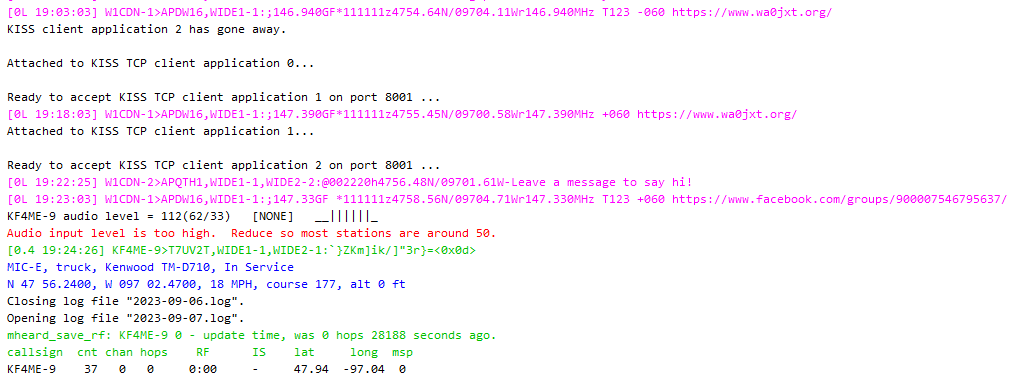
It looks like the reconnections have been happening, but didn't record this packet:
Replaced
BlockingSchedulerwithBackgroundSchedulerper https://apscheduler.readthedocs.io/en/3.x/userguide.html#choosing-the-right-scheduler-job-store-s-executor-s-and-trigger-s.Going to wait and see if this error causes any problems or not. Although I'm not sure why this would happen if I'm calling
ki.stop().Still not working. May need to try
AsyncIOScheduler, which I think is where the error is coming from.Seeing the same thing even with a pause between closing and reopening the connection, but the connection is obviously no longer there (doesn't show packets I just sent).
But the dw log also shows
KISS client application 0 has gone away.when I kill the aprs_api process. So I don't really know what's up.Likely some more package collisions going on: #30 (comment)
I don't know if this is even an issue on the kiss connection side, or whether my code is just hanging. It might be related to inability to parse certain packets (like #32). Noticed that it just stopped responding today a few times (#38 (comment)). I think I previously thought this was because of a lack of connection, but in this example, the program didn't get to the next debug line, which would have been "Inserting into database".
from
aprs_api.log:I took this far down the wrong path, and I think my observation in the last post is correct. At #38, I am adding log messages to track exactly what packets are causing the code to fail and I will work through those so it quits failing.