until map made, add link to aprs.fi with station query
table of stations heard direct Not sure if necessary right now. Want to finish up this MR.
Closes #16, #36.
- ~~add `stations` table to `schema.sql` once it works.~~
- [x] use relative links in template and API calls
- [x] show "time ago" or local time in tables
- [x] until map made, add link to aprs.fi with station query
- ~~table of stations heard direct~~ Not sure if necessary right now. Want to finish up this MR.
I set up a query in unique_stations() to show the station list for now, but if frames is cleaned up periodically (#31), the station list may still be useful in the future.
I have this comment in place in tcp_kiss_send_recv.py: # TODO update stations table here
The UND digipeater is down(?) right now, so not seeing a lot of packets to test with.
Experimenting with new `stations` table.
```
CREATE TABLE "stations" (
"id" INTEGER NOT NULL UNIQUE,
"from" TEXT UNIQUE,
"frames_id" INTEGER,
"last_heard_unix" INTEGER,
"count" INTEGER,
PRIMARY KEY("id" AUTOINCREMENT)
);
```
I set up a query in `unique_stations()` to show the station list for now, but if `frames` is cleaned up periodically (#31), the station list may still be useful in the future.
I have this comment in place in `tcp_kiss_send_recv.py`:
`# TODO update stations table here`
The UND digipeater is down(?) right now, so not seeing a lot of packets to test with.
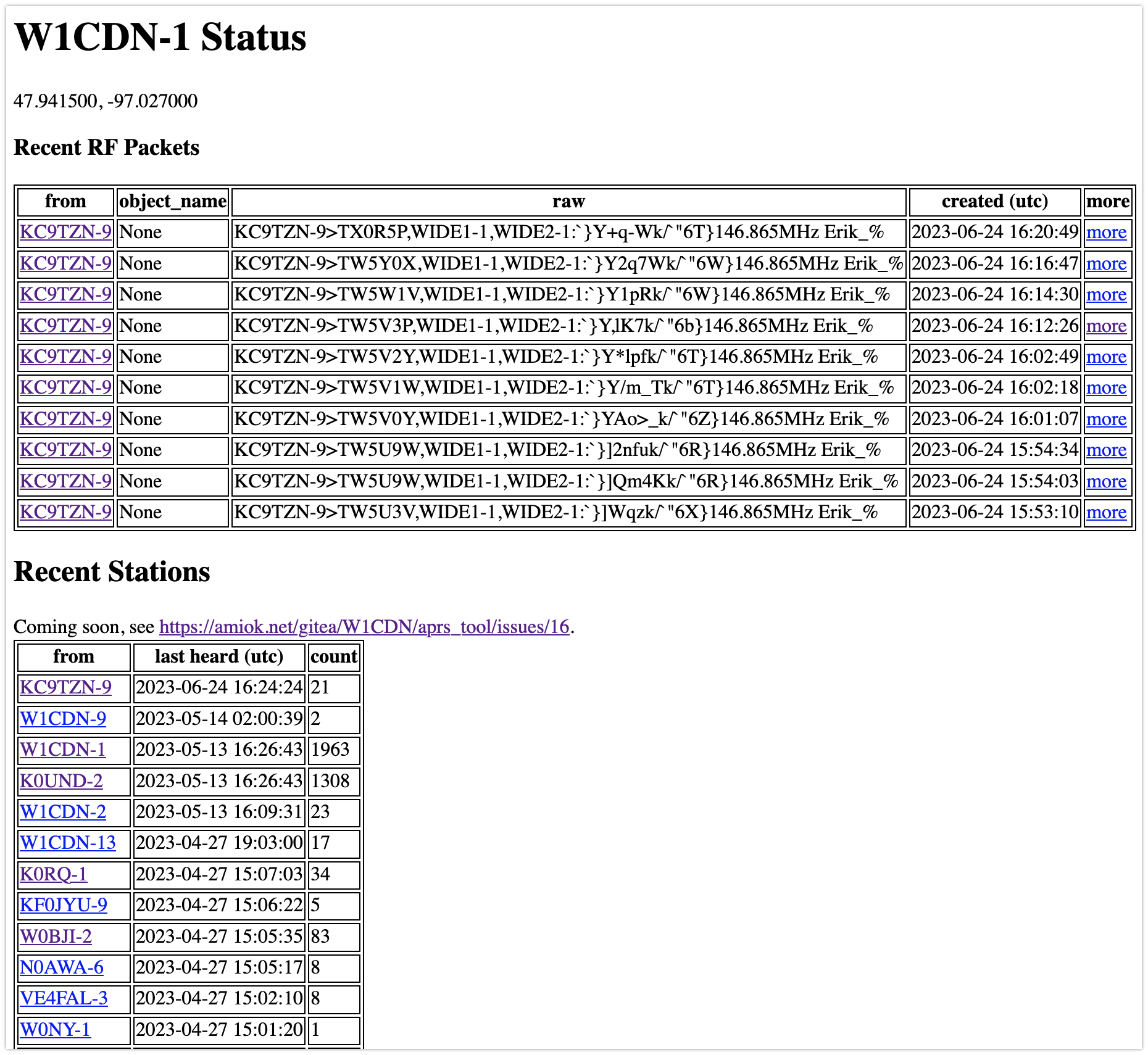
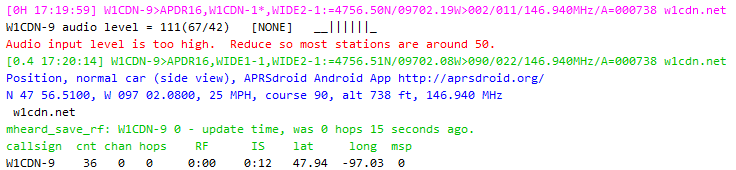
This packet isn't included, why? Is it because I restarted direwolf earlier, but didn't restart this app?

Got test_db.py as an example for upsert code. Added the stations table definition to schema.sql so I can track changes there.
Will have to manually fill in the table to match what I have in my own db so far, but that should be a utility SQLite statement to have around.
SELECT [from], MAX(id), created_unix, COUNT(id) FROM frames GROUP BY "from" ORDER BY MAX(id) DESC
Got test_db.py as an example for upsert code. Added the stations table definition to schema.sql so I can track changes there.
Will have to manually fill in the table to match what I have in my own db so far, but that should be a utility SQLite statement to have around.
`SELECT [from], MAX(id), created_unix, COUNT(id) FROM frames GROUP BY "from" ORDER BY MAX(id) DESC`
Need to access the stations list via a new API endpoint.
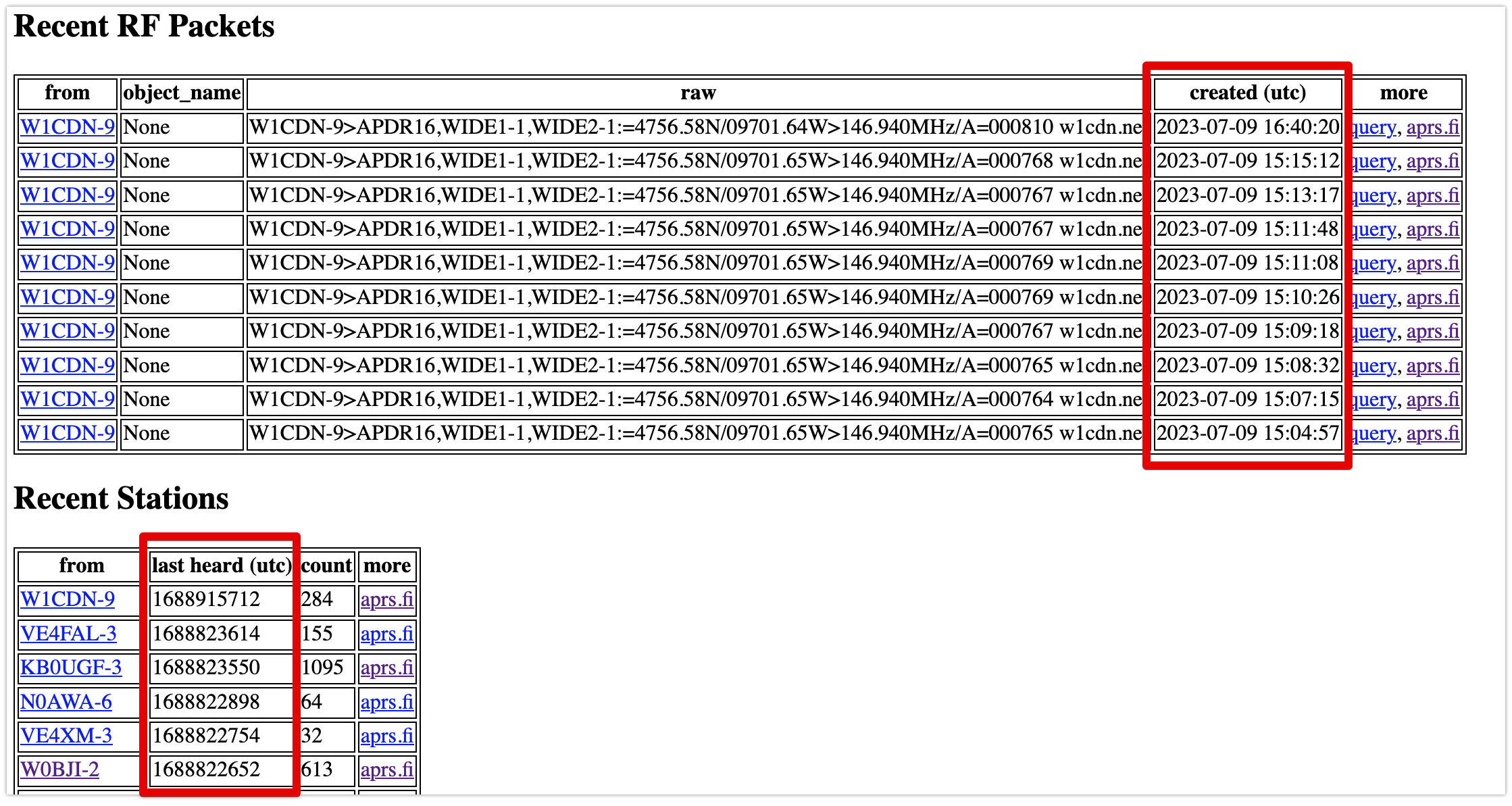
This should give dates in the right format. Top table here uses API, bottom is raw db query results:
Need to access the stations list via a new API endpoint.
This should give dates in the right format. Top table here uses API, bottom is raw db query results:

Still need to figure out relative paths, though. Works on dev but not on production.
# this should work: stations = json.loads(requests.get(url_for("stations", _external=True)).text)['data']
stations = json.loads(requests.get("https://digi.w1cdn.net/aprs_api/stations").text)['data']
Eh, the times work for now.
Still need to figure out relative paths, though. Works on dev but not on production.
```
# this should work: stations = json.loads(requests.get(url_for("stations", _external=True)).text)['data']
stations = json.loads(requests.get("https://digi.w1cdn.net/aprs_api/stations").text)['data']
```
OSError: Undelrying connection is not active. Hint: did you call start()?
Also, broke something about the KISS connection. A restart fixes this, but how can this be stabilized?
Can't stop the connection, or we can't see the packets coming in. So I'm still thinking about AGWPE: #5 (comment)
> OSError: Undelrying connection is not active. Hint: did you call start()?
Also, broke something about the KISS connection. A restart fixes this, but how can this be stabilized?
Can't stop the connection, or we can't see the packets coming in. So I'm still thinking about AGWPE: https://amiok.net/gitea/W1CDN/aprs_tool/issues/5#issuecomment-869

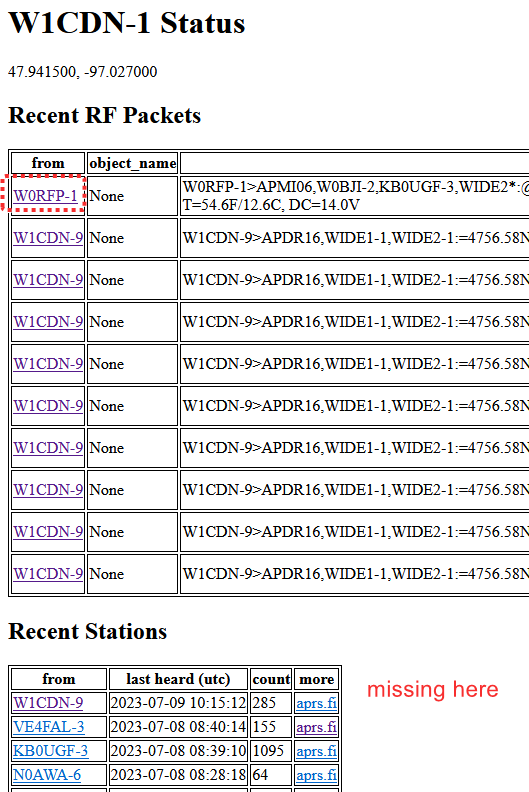
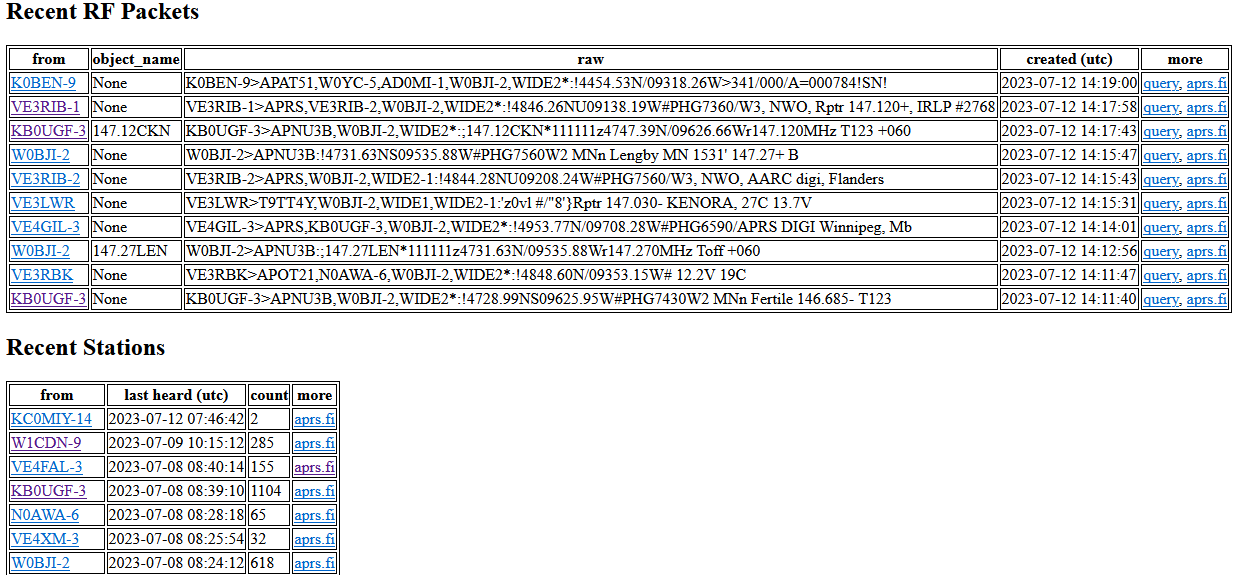
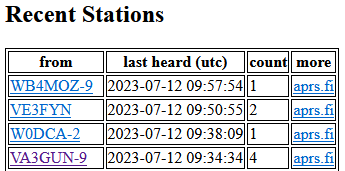
It's actually lower down in the table, so it must not have been updated.
Update with more weirdness:
It's actually lower down in the table, so it must not have been updated.

Update with more weirdness:

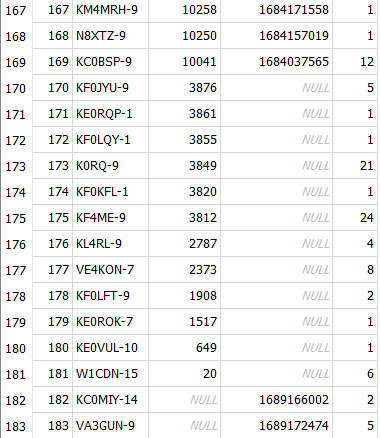
I was not updating the timestamp in the stations table, only the count. Got it figured out.
There is still a bug with KISS connections. Had to restart direwolf to dump any connections that were being held. Still limited to 3 connections.
I was not updating the timestamp in the stations table, only the count. Got it figured out.
There is still a bug with KISS connections. Had to restart direwolf to dump any connections that were being held. Still limited to 3 connections.
Yep, work on #37 next. There must be a way to monitor connections (#34).
Is there an async connection to be used? See https://github.com/python-aprs/kiss3/blob/main/examples/tcp_async.py (not that this is kiss3, not aprs package).
Still thinking about where this message might be coming from, and how to check the connection periodically.

Something with threads? https://github.com/python-aprs/kiss3/issues/8 What?
Note that I am using https://github.com/ampledata/aprs (I think) which uses `kiss`, not https://github.com/python-aprs/aprs3, which uses `kiss3`.
Also using `aprslib` (https://github.com/rossengeorgiev/aprs-python) to decode, but that doesn't touch the connection AFAIK. It's really for IS: https://github.com/rossengeorgiev/aprs-python/issues/19
Running interactively, you can get some info from the ki object:
>>> ki = aprs.TCPKISS(host="localhost", port=8001)
>>> ki
TCPKISS(_protocol=None)
>>> ki.start()
>>> ki
TCPKISS(_protocol=KISSProtocol(transport=<_SelectorSocketTransport fd=6 read=polling write=<idle, bufsize=0>>, frames=<Queue at 0x75c57e70 maxsize=0>, connection_future=<Future finished result=<_SelectorSoc...e, bufsize=0>>>, decoder=APRSDecode(_last_pframe=b'', strip_df_start=True)))
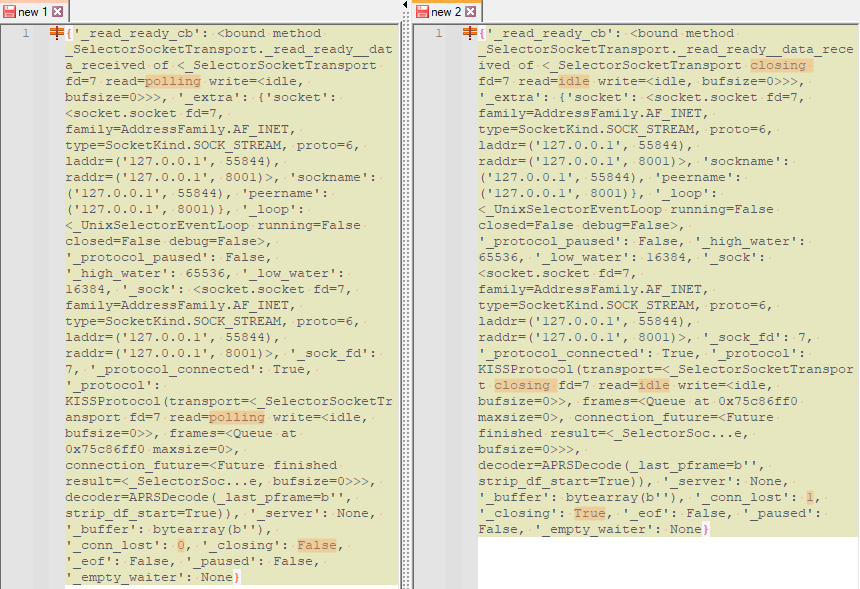
Digging in more with vars(ki._protocol.transport), there are some differences in the connection when started vs stopped. Maybe look at _conn_lost periodically?
Running interactively, you can get some info from the `ki` object:
```
>>> ki = aprs.TCPKISS(host="localhost", port=8001)
>>> ki
TCPKISS(_protocol=None)
>>> ki.start()
>>> ki
TCPKISS(_protocol=KISSProtocol(transport=<_SelectorSocketTransport fd=6 read=polling write=<idle, bufsize=0>>, frames=<Queue at 0x75c57e70 maxsize=0>, connection_future=<Future finished result=<_SelectorSoc...e, bufsize=0>>>, decoder=APRSDecode(_last_pframe=b'', strip_df_start=True)))
```
Digging in more with `vars(ki._protocol.transport)`, there are some differences in the connection when started vs stopped. Maybe look at `_conn_lost` periodically?

while True:
if <the connection is not open>
ki.start()
time.sleep(60)
Once I figure out how to get the data out of above, I think I can check the connection every so often using one of these solutions: https://stackoverflow.com/questions/474528/how-to-repeatedly-execute-a-function-every-x-seconds?noredirect=1&lq=1
e.g.,
```
while True:
if <the connection is not open>
ki.start()
time.sleep(60)
```
To test this, I can write up a test connection to run locally, establish the connection, the unplug the network and see what happens. Plug back in to see if reconnect is successful.
Before running `ki.start()`, running `ki` gets you `TCPKISS(_protocol=None)`.
But after running, you can run `ki._protocol.transport._protocol_connected` to get the value.
So maybe check for
`ki._protocol.transport._protocol_connected` and/or
`ki._protocol.transport._conn_lost` and/or
`ki._protocol.transport._closing`?
And need to check whether it has been started ever by looking for the `_protocol.transport` attribute, but that still exists even after a stop:
```
>>> ki = aprs.TCPKISS(host="localhost", port=8001)
>>> hasattr(ki, "_protocol")
True
>>> hasattr(ki._protocol, "transport")
False
>>> ki.start()
>>> hasattr(ki._protocol, "transport")
True
>>> ki.stop()
>>> hasattr(ki._protocol, "transport")
True
```
`hasattr()` notes: https://stackoverflow.com/questions/610883/how-do-i-check-if-an-object-has-an-attribute
To test this, I can write up a test connection to run locally, establish the connection, the unplug the network and see what happens. Plug back in to see if reconnect is successful.
I tried this, and it never realized it was disconnected after a few minutes of being disconnected. Which makes sense unless the connection status is already being updated in the background where I can't find it.
The connection exists even when the server isn't accessible. How do you check that?
>>> ki = aprs.TCPKISS(host="192.168.0.30", port=8001)
>>> ki.read()
Traceback (most recent call last):
File "<stdin>", line 1, in <module>
File "/usr/local/lib/python3.9/site-packages/ax253/decode.py", line 243, in read
if self.protocol is None:
File "/usr/local/lib/python3.9/site-packages/ax253/decode.py", line 183, in protocol
raise IOError(
OSError: Underlying connection is not active. Hint: did you call start()?
>>> ki.start()
>>> ki.read()
[]
Unplug network
>>> ki.read()
[]
It seems like there's no way to check whether the connection is there or not. Is there a timeout on either end?
Might have to check only hourly and run ki.stop(); ki.start() just to be sure?
> To test this, I can write up a test connection to run locally, establish the connection, the unplug the network and see what happens. Plug back in to see if reconnect is successful.
I tried this, and it never realized it was disconnected after a few minutes of being disconnected. Which makes sense unless the connection status is already being updated in the background where I can't find it.
The connection exists even when the server isn't accessible. How do you check that?
```
>>> ki = aprs.TCPKISS(host="192.168.0.30", port=8001)
>>> ki.read()
Traceback (most recent call last):
File "<stdin>", line 1, in <module>
File "/usr/local/lib/python3.9/site-packages/ax253/decode.py", line 243, in read
if self.protocol is None:
File "/usr/local/lib/python3.9/site-packages/ax253/decode.py", line 183, in protocol
raise IOError(
OSError: Underlying connection is not active. Hint: did you call start()?
>>> ki.start()
>>> ki.read()
[]
```
Unplug network
```
>>> ki.read()
[]
```
It seems like there's no way to check whether the connection is there or not. Is there a timeout on either end?
Might have to check only hourly and run `ki.stop(); ki.start()` just to be sure?
Underlying connection is not active. Hint: did you call start()?
Maybe I can dig this out of the connection, somehow?
Might try to drop this from `1` to `None` as in the example at https://github.com/python-aprs/kiss3/blob/main/examples/tcp_send_recv.py:
`for frame in ki.read(min_frames=1):`
-----
Also, I found the source of this error: https://github.com/python-aprs/ax253/blob/67ba4681c7b52925622a0266f8cf4c0cc041e8fa/src/ax253/decode.py#L184C28-L184C28
`Underlying connection is not active. Hint: did you call start()?`
Maybe I can dig this out of the connection, somehow?

About the connection query issue: I asked on a kiss3 GitHub issue because that might be under more active development. https://github.com/python-aprs/kiss3/issues/9
ETA: Have been using kiss3 (as part of aprs3) locally, but maybe not on real server. See below.
No response. ~~Next up is to swap in the kiss3 package (see if it basically works)~~ and then try the async method, I guess. https://github.com/python-aprs/kiss3/blob/main/examples/tcp_async.py
ETA: Have been using `kiss3` (as part of `aprs3`) locally, but maybe not on real server. See below.
Based on some old logs (I just added timestamps tonight), I have been calling the older version of aprs package (https://github.com/ampledata/aprs) and not the new version (https://github.com/python-aprs/aprs3). Would it hurt for people to avoid naming collisions? Both of them use import aprs unlike the difference between import kiss and import kiss3.
So before I dig any more into this, I'm going to let it run and watch the log file.
Based on some old logs (I just added timestamps tonight), I have been calling the older version of `aprs` package (https://github.com/ampledata/aprs) and not the new version (https://github.com/python-aprs/aprs3). Would it hurt for people to avoid naming collisions? Both of them use `import aprs` unlike the difference between `import kiss` and `import kiss3`.

So before I dig any more into this, I'm going to let it run and watch the log file.
kiss_and_db.py as subprocess pid 8673
Traceback (most recent call last):
File "kiss_and_db.py", line 116, in <module>
main()
File "kiss_and_db.py", line 33, in main
ki = aprs.TCPKISS(host=config['Settings']['kiss_host'], port=int(config['Settings']['kiss_port']))
AttributeError: module 'aprs' has no attribute 'TCPKISS'
Woops, broke it:
```
kiss_and_db.py as subprocess pid 8673
Traceback (most recent call last):
File "kiss_and_db.py", line 116, in <module>
main()
File "kiss_and_db.py", line 33, in main
ki = aprs.TCPKISS(host=config['Settings']['kiss_host'], port=int(config['Settings']['kiss_port']))
AttributeError: module 'aprs' has no attribute 'TCPKISS'
```
Very confused now. I was apparently using some combination of versions of aprs and kiss, and now need to get back to a working system.
Getting things like this in the log now: 2023-08-26 11:03:23,373 - Parsing: b'\x00\x82\xa0\x88\xa4bl\xe0\xaeb\x86\x88\x9c@r\xae\x92\x88\x8ab@b\xae\x92\x88\x8ad@c\x03\xf0=4756.58N/09701.64W>146.940MHz/A=000742 https://w1cdn.net'
and being told that aprs.TCPKISS() is a real method, even though I was using it for a long time.
Very confused now. I was apparently using some combination of versions of aprs and kiss, and now need to get back to a working system.
Getting things like this in the log now: `2023-08-26 11:03:23,373 - Parsing: b'\x00\x82\xa0\x88\xa4bl\xe0\xaeb\x86\x88\x9c@r\xae\x92\x88\x8ab@b\xae\x92\x88\x8ad@c\x03\xf0=4756.58N/09701.64W>146.940MHz/A=000742 https://w1cdn.net'`
and being told that `aprs.TCPKISS()` is a real method, even though I was using it for a long time.
Now have aprs3, kiss, and kiss3 installed with pip3, but not aprs. This at least will connect to direwolf.
Installed together:
aprs3, kiss, kiss3 - connects to dw
aprs3, kiss - doesn't connect, error
aprs3, kiss3 -
Ahh, something weird hanging out in "/home/pi/.local/lib/python3.7/site-packages/aprs/__init__.py" that pip3 uninstall doesn't touch.
Is it some weird user/sudo package namespace thing I don't understand? No, messed with sudo pip and found out it's not recommended.
This seems to get things running again: pip install --upgrade --force-reinstall aprs3 but still with both kiss and kiss3 in addition.
Now have aprs3, kiss, and kiss3 installed with pip3, but not aprs. This at least will connect to direwolf.
Installed together:
- aprs3, kiss, kiss3 - connects to dw
- aprs3, kiss - doesn't connect, error
- aprs3, kiss3 -
Ahh, something weird hanging out in `"/home/pi/.local/lib/python3.7/site-packages/aprs/__init__.py"` that pip3 uninstall doesn't touch.
Is it some weird user/sudo package namespace thing I don't understand? No, messed with sudo pip and found out it's not recommended.
This seems to get things running again: `pip install --upgrade --force-reinstall aprs3` but still with both kiss and kiss3 in addition.
Traceback (most recent call last):
File "kiss_and_db.py", line 4, in <module>
import aprs
File "/home/pi/.local/lib/python3.7/site-packages/aprs/__init__.py", line 45, in <module>
from .kiss import create_serial_connection, create_tcp_connection, SerialKISS, TCPKISS
File "/home/pi/.local/lib/python3.7/site-packages/aprs/kiss.py", line 22, in <module>
class APRSDecode(kiss.KISSDecode):
AttributeError: module 'kiss' has no attribute 'KISSDecode'
I guess it needs both? I don't understand.
With aprs3 and only kiss *or* kiss3:
```
Traceback (most recent call last):
File "kiss_and_db.py", line 4, in <module>
import aprs
File "/home/pi/.local/lib/python3.7/site-packages/aprs/__init__.py", line 45, in <module>
from .kiss import create_serial_connection, create_tcp_connection, SerialKISS, TCPKISS
File "/home/pi/.local/lib/python3.7/site-packages/aprs/kiss.py", line 22, in <module>
class APRSDecode(kiss.KISSDecode):
AttributeError: module 'kiss' has no attribute 'KISSDecode'
```
I guess it needs both? I don't understand.
Blocking a user prevents them from interacting with repositories, such as opening or commenting on pull requests or issues. Learn more about blocking a user.
Closes #16, #36.
addstationstable toschema.sqlonce it works.table of stations heard directNot sure if necessary right now. Want to finish up this MR.Experimenting with new
stationstable.I set up a query in
unique_stations()to show the station list for now, but ifframesis cleaned up periodically (#31), the station list may still be useful in the future.I have this comment in place in
tcp_kiss_send_recv.py:# TODO update stations table hereThe UND digipeater is down(?) right now, so not seeing a lot of packets to test with.
stationstable. 8972c8d447Exciting to see live https://digi.w1cdn.net/aprs_api:
This packet isn't included, why? Is it because I restarted direwolf earlier, but didn't restart this app?
Got test_db.py as an example for upsert code. Added the stations table definition to schema.sql so I can track changes there.
Will have to manually fill in the table to match what I have in my own db so far, but that should be a utility SQLite statement to have around.
SELECT [from], MAX(id), created_unix, COUNT(id) FROM frames GROUP BY "from" ORDER BY MAX(id) DESCStations table update seems to work now. Need to query the stations table at index.html rather than doing the math on the frames table.
Need to access the stations list via a new API endpoint.
This should give dates in the right format. Top table here uses API, bottom is raw db query results:
Eh, the times work for now.
Still need to figure out relative paths, though. Works on dev but not on production.
Also, broke something about the KISS connection. A restart fixes this, but how can this be stabilized?
Can't stop the connection, or we can't see the packets coming in. So I'm still thinking about AGWPE: #5 (comment)
It's actually lower down in the table, so it must not have been updated.
Update with more weirdness:
In
e3cb68551b, tried to commit frames first, then update stations, but still not seeing consistency.Ugh, these are also local time, not UTC:
Missing some timestamps...
I was not updating the timestamp in the stations table, only the count. Got it figured out.
There is still a bug with KISS connections. Had to restart direwolf to dump any connections that were being held. Still limited to 3 connections.
Yep, work on #37 next. There must be a way to monitor connections (#34).
Is there an async connection to be used? See https://github.com/python-aprs/kiss3/blob/main/examples/tcp_async.py (not that this is kiss3, not aprs package).
If packet is an object, aprs.fi link should track the object name, not the station name (or have a link for each?)
Still thinking about where this message might be coming from, and how to check the connection periodically.
Something with threads? https://github.com/python-aprs/kiss3/issues/8 What?
Note that I am using https://github.com/ampledata/aprs (I think) which uses
kiss, not https://github.com/python-aprs/aprs3, which useskiss3.Also using
aprslib(https://github.com/rossengeorgiev/aprs-python) to decode, but that doesn't touch the connection AFAIK. It's really for IS: https://github.com/rossengeorgiev/aprs-python/issues/19Running interactively, you can get some info from the
kiobject:Digging in more with
vars(ki._protocol.transport), there are some differences in the connection when started vs stopped. Maybe look at_conn_lostperiodically?Once I figure out how to get the data out of above, I think I can check the connection every so often using one of these solutions: https://stackoverflow.com/questions/474528/how-to-repeatedly-execute-a-function-every-x-seconds?noredirect=1&lq=1
e.g.,
Before running
ki.start(), runningkigets youTCPKISS(_protocol=None).But after running, you can run
ki._protocol.transport._protocol_connectedto get the value.So maybe check for
ki._protocol.transport._protocol_connectedand/orki._protocol.transport._conn_lostand/orki._protocol.transport._closing?And need to check whether it has been started ever by looking for the
_protocol.transportattribute, but that still exists even after a stop:hasattr()notes: https://stackoverflow.com/questions/610883/how-do-i-check-if-an-object-has-an-attributeTo test this, I can write up a test connection to run locally, establish the connection, the unplug the network and see what happens. Plug back in to see if reconnect is successful.
I tried this, and it never realized it was disconnected after a few minutes of being disconnected. Which makes sense unless the connection status is already being updated in the background where I can't find it.
The connection exists even when the server isn't accessible. How do you check that?
Unplug network
It seems like there's no way to check whether the connection is there or not. Is there a timeout on either end?
Might have to check only hourly and run
ki.stop(); ki.start()just to be sure?Might try to drop this from
1toNoneas in the example at https://github.com/python-aprs/kiss3/blob/main/examples/tcp_send_recv.py:for frame in ki.read(min_frames=1):Also, I found the source of this error: https://github.com/python-aprs/ax253/blob/67ba4681c7b52925622a0266f8cf4c0cc041e8fa/src/ax253/decode.py#L184C28-L184C28
Underlying connection is not active. Hint: did you call start()?Maybe I can dig this out of the connection, somehow?

About the connection query issue: I asked on a kiss3 GitHub issue because that might be under more active development. https://github.com/python-aprs/kiss3/issues/9
No response.
Next up is to swap in the kiss3 package (see if it basically works)and then try the async method, I guess. https://github.com/python-aprs/kiss3/blob/main/examples/tcp_async.pyETA: Have been using
kiss3(as part ofaprs3) locally, but maybe not on real server. See below.Based on some old logs (I just added timestamps tonight), I have been calling the older version of
aprspackage (https://github.com/ampledata/aprs) and not the new version (https://github.com/python-aprs/aprs3). Would it hurt for people to avoid naming collisions? Both of them useimport aprsunlike the difference betweenimport kissandimport kiss3.So before I dig any more into this, I'm going to let it run and watch the log file.
Woops, broke it:
Very confused now. I was apparently using some combination of versions of aprs and kiss, and now need to get back to a working system.
Getting things like this in the log now:
2023-08-26 11:03:23,373 - Parsing: b'\x00\x82\xa0\x88\xa4bl\xe0\xaeb\x86\x88\x9c@r\xae\x92\x88\x8ab@b\xae\x92\x88\x8ad@c\x03\xf0=4756.58N/09701.64W>146.940MHz/A=000742 https://w1cdn.net'and being told that
aprs.TCPKISS()is a real method, even though I was using it for a long time.Now have aprs3, kiss, and kiss3 installed with pip3, but not aprs. This at least will connect to direwolf.
Installed together:
Ahh, something weird hanging out in
"/home/pi/.local/lib/python3.7/site-packages/aprs/__init__.py"that pip3 uninstall doesn't touch.Is it some weird user/sudo package namespace thing I don't understand? No, messed with sudo pip and found out it's not recommended.
This seems to get things running again:
pip install --upgrade --force-reinstall aprs3but still with both kiss and kiss3 in addition.With aprs3 and only kiss or kiss3:
I guess it needs both? I don't understand.
I hacked my way through relative links so I could close this sprawling MR. Will let it run a bit and see what issues pop up.